
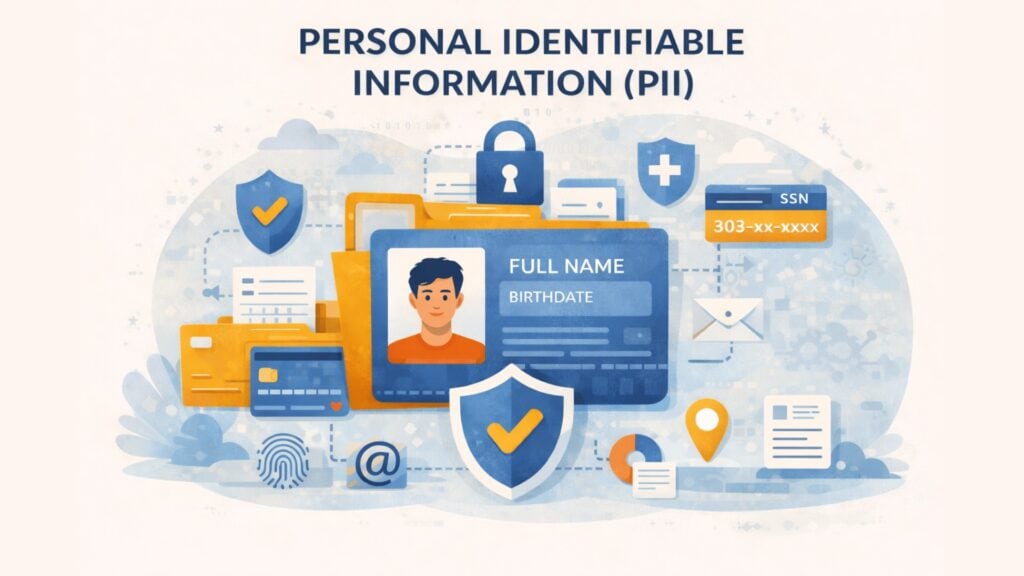
Personally identifiable information (PII) is one of the most important data categories a business handles. If your website collects names, email addresses, billing details, IP addresses, account records, or identity documents, you are dealing with information that can identify a person directly or indirectly. In the EU, the broader legal term is usually personal data, and the European Commission defines it as any information relating to an identified or identifiable person. The ICO also makes clear that identifiability can be direct or indirect, including identifiers such as names, numbers, IP addresses, or cookie identifiers.
For website operators, IT managers, and business decision-makers, this is not only a legal issue. It is a security, trust, and operational issue. When PII is exposed, attackers can use it for phishing, fraud, account takeover, impersonation, and identity theft. NIST’s guide to protecting PII focuses on exactly this problem: organizations need to identify PII in context and protect it from inappropriate access, use, and disclosure.
Table of contents
- What Is Personally Identifiable Information (PII)?
- Direct vs. Indirect Identifiers
- PII vs. Personal Data vs. Sensitive Data
- Why PII Matters for Businesses
- Real-World Risks and Attack Patterns
- Risks and Consequences of PII Exposure
- How Businesses Should Protect PII
- PII Protection on Websites and Forms
- Future Outlook
- Conclusion
- FAQ – Frequently Asked Questions
What Is Personally Identifiable Information (PII)?
Personally identifiable information (PII) is any information that can identify a specific individual, either on its own or when combined with other data. Common examples include full name, national ID number, passport number, email address, phone number, account identifiers, and in some contexts IP address, cookie ID, location data, or biometric information. The exact boundary depends on context, because some data points identify a person immediately while others only do so when linked with other records.
This is also where the terminology matters. In US security practice, PII is widely used. Under the GDPR, the broader and more important legal term is personal data. The European Commission explains that personal data includes any information relating to an identified or identifiable individual, and that several separate pieces of information can still count as personal data when combined to identify someone.
For a business audience, the practical takeaway is simple: if the data can point to a real person, help identify one, or be combined with other information to do so, it should be handled as sensitive business data.
Direct vs. Indirect Identifiers
Not all identifiers work in the same way. Some identify a person directly. Others do so only when combined with additional information.
A direct identifier usually points to one person without much extra context. Examples include a full name paired with a customer account, a passport number, a tax ID, or a company email assigned to a named employee. An indirect identifier may look less sensitive at first. Examples include IP address, cookie ID, location history, date of birth, job title, device ID, or customer number. On their own, those fields may not always identify someone. In context, they often do. The ICO stresses exactly this point: information can still be personal data if it identifies someone indirectly.
This matters because many businesses underestimate “ordinary” technical or operational data. A single log entry may not seem sensitive. A collection of log entries tied to account behavior, device details, and location can become highly identifying. That is why good privacy and security work depends on context, not only on obvious fields like names or ID numbers. NIST’s PII guidance takes the same context-based approach.
PII vs. Personal Data vs. Sensitive Data
These terms are related, but they are not identical.
PII is a broad cybersecurity and information security term. Personal data is the core GDPR term and is broader in many business contexts. Under the GDPR, information does not need to name a person directly to qualify. If it relates to an identifiable natural person, it can still be personal data.
Then there is sensitive data, which usually refers to data that creates higher risk if mishandled. Under the GDPR, certain special categories of personal data receive stronger protection, such as health data, biometric data used for identification, political opinions, religious beliefs, and information about sex life or sexual orientation. Even outside those formal categories, businesses often treat financial records, identity documents, and authentication data as highly sensitive because misuse can cause immediate harm.
This distinction matters for governance. A newsletter email address and a passport scan are not the same operational risk. Both may be personal data. One usually requires much stricter controls.
Why PII Matters for Businesses
PII matters because it sits at the intersection of trust, fraud, security, and compliance. If customer or employee data is exposed, attackers can use it for credential theft, impersonation, account recovery abuse, phishing, or identity fraud. ENISA’s identity theft overview describes identity theft as the illicit use of a victim’s PII to impersonate that person and gain financial or other benefits.
It also matters because privacy law is broad. In Europe, once an organization processes personal data, the GDPR may apply. The European Commission’s guidance makes clear that personal data includes direct and indirect identifiers, and that multiple data elements can become personal data when linked together.
For business leaders, the real issue is not only fines. It is the cost of losing control over customer trust, incident response time, support burden, legal review, breach notification, and internal disruption. PII protection is therefore not a side issue for compliance teams. It is part of basic operational resilience.
Real-World Risks and Attack Patterns
Attackers target PII because it is reusable. A password can be changed. A birth date, home address, identity number, or medical detail often cannot.
One common attack pattern is phishing. A criminal impersonates a trusted brand or internal contact and tricks a person into disclosing credentials or personal details. A second pattern is credential stuffing and account takeover, where exposed email addresses and reused passwords are used against login systems. A third pattern is automated harvesting, where bots scrape public profiles, forms, leaked directories, or poorly protected endpoints for personal information. ENISA’s data breach and identity theft materials both connect exposed personal data with fraud and identity misuse.
A more damaging scenario is a large-scale breach involving special-category or high-sensitivity personal data. The Vastaamo case in Finland became a major European example because attackers did not only steal patient data. They also used it for extortion against individuals, showing how severe the impact becomes when highly personal information is exposed.
Risks and Consequences of PII Exposure
When PII is exposed, the consequences often spread beyond the first incident. The immediate risk may be fraud, phishing, or unauthorized access. The longer-term risk is that the same data keeps circulating and being reused in later attacks.
NIST’s PII guidance centers on confidentiality because inappropriate access, use, and disclosure can cause concrete harm to individuals and organizations. ENISA’s breach severity methodology also highlights likely impacts such as identity theft, fraud, humiliation, and reputational damage after a personal data breach.
For businesses, the secondary damage can be just as serious. Support teams must handle affected users. Security teams must investigate. Legal teams may need to assess notification duties. Leadership must answer customer and partner questions. A PII breach is rarely just a technical event. It quickly becomes an operational and reputational one.
How Businesses Should Protect PII
The strongest protection starts with data minimization. If you do not collect unnecessary personal data, you do not need to secure, retain, classify or delete it later. The EDPB’s guidance on secure personal data supports this risk-based approach and reminds organizations to adapt safeguards to the context and risk of the processing.
Next comes access control. Employees should only access the personal data they need for their role. Authentication should be strong, and sensitive workflows should be monitored. Encryption matters too, both in transit and at rest, especially for databases, backups, exported files, and administrative systems. NIST’s PII guidance recommends safeguards tailored to the sensitivity and context of the data involved.
Retention also matters. Many organizations store personal data longer than they need to. That increases risk without adding business value. Good governance means knowing what you collect, where it lives, who can access it, why it is needed, and when it should be deleted.
PII Protection on Websites and Forms
For websites, some of the highest-risk moments happen at the point of collection. Registration forms, login pages, contact forms, checkout flows, support portals, and account recovery pages often process personal data directly.
That makes web-facing protection important. Businesses should secure transport, validate inputs, log suspicious behavior carefully, and limit unnecessary data collection. They should also protect forms and login flows against automated abuse. Bots often target public forms for scraping, fake signups, credential attacks, and account recovery abuse. A privacy-focused CAPTCHA can help reduce that automated pressure before it turns into data loss or fraud.
For European organizations, captcha.eu fits this supporting role well. It is not a replacement for encryption, access control, or privacy governance. It is a practical control that helps reduce automated abuse on the public-facing systems where PII is often collected first.
Future Outlook
PII risk is expanding because more systems generate more identifiers than before. Websites, mobile apps, analytics tools, support platforms, identity systems, and connected devices all create data that may identify someone directly or indirectly.
The main challenge is no longer just storing customer data safely. It is understanding how many small data points can be linked together. The ICO’s guidance on indirect identification is especially relevant here, because businesses often underestimate how easily ordinary technical and behavioral data can become personal data in context.
The strategic direction is clear. Businesses need stronger data mapping, less unnecessary collection, better protection at collection points, and more disciplined retention. Privacy by design is no longer optional. It is becoming the only scalable way to manage personal data risk.
Conclusion
Personally identifiable information, or PII, is not just a legal label. It is a practical security category that affects fraud risk, customer trust, compliance exposure, and incident response.
For businesses, the right approach is structured and realistic. Know what personal data you collect. Distinguish between direct and indirect identifiers. Limit collection where possible. Protect access. Secure web-facing entry points. Delete what you no longer need. In that model, strong privacy governance protects the data itself, while controls such as captcha.eu help reduce automated abuse where personal data first enters the system.
FAQ – Frequently Asked Questions
What is personally identifiable information (PII)?
PII is information that can identify a specific person directly or indirectly. That can include names, ID numbers, email addresses, account records, IP addresses, or other data that can be linked to an individual.
Is an email address considered PII?
Yes, in most business contexts it is. An email address can identify or contact a person and is commonly treated as personal data under privacy law.
What is the difference between PII and personal data?
PII is a broad security term. Personal data is the broader legal term used by the GDPR. Under the GDPR, information can count as personal data even if it identifies someone only indirectly.
Why is PII valuable to attackers?
Because it can be reused for phishing, fraud, impersonation, account takeover, and identity theft. Unlike passwords, many personal details cannot easily be changed after exposure.
How can I protect PII on my website?
Use data minimization, encryption, access control, strong authentication, careful retention rules, and protection against automated abuse on forms and login pages. CAPTCHA can support that web-facing layer by reducing bot-driven scraping and credential attacks.
100 free requests
You have the opportunity to test and try our product with 100 free requests.
If you have any questions
Contact us
Our support team is available to assist you.
 English
  German
  French
  Spanish
  Dutch
Dutch  Italian