
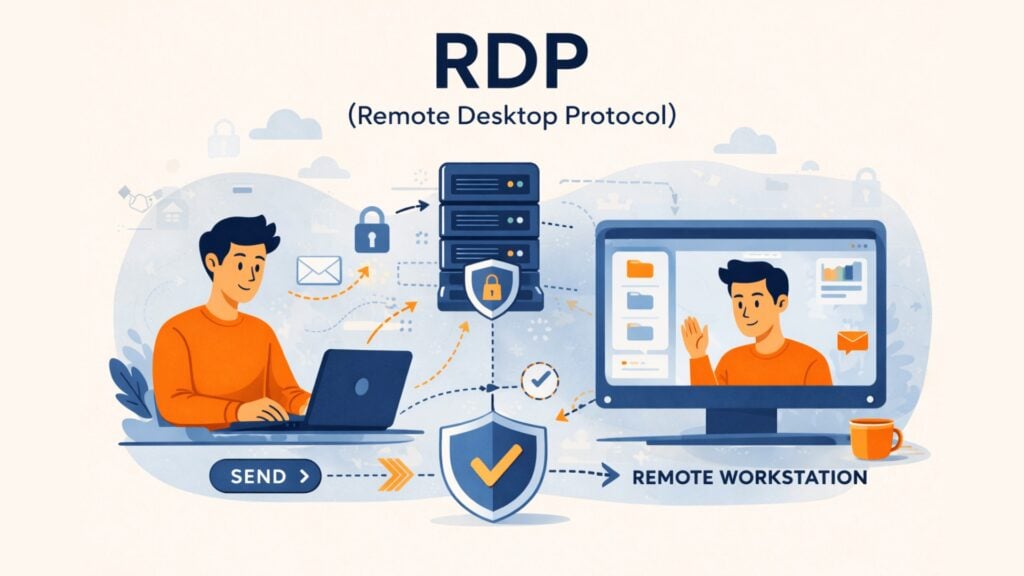
Remote access has become a standard part of modern IT infrastructure. Employees work from home, administrators manage servers remotely, and support teams troubleshoot systems without being physically present. To operate efficiently in this environment, organizations rely on technologies that allow secure remote connections to internal systems. One of the most widely used technologies for this purpose is the Remote Desktop Protocol, commonly known as RDP.
Understanding RDP is essential for IT managers, website operators, and decision-makers responsible for digital infrastructure. Remote desktop access improves efficiency, but it also introduces serious security considerations. Cybercriminals frequently target exposed remote access services because they offer a direct path into corporate networks.
Organizations that understand how RDP works and implement proper safeguards can significantly reduce their exposure to ransomware, credential theft, and network intrusion. Businesses that ignore these risks often discover them only after a costly breach.
To truly define yourself as a security-aware organization, you must understand both the benefits and the risks of RDP.
Table of contents
What Is RDP?
Remote Desktop Protocol (RDP) is a network communication protocol developed by Microsoft that allows a user to remotely access and control another computer through a graphical interface over a network connection.
In practical terms, RDP allows a user to interact with a remote system as if they were sitting in front of it. The local device sends keyboard inputs and mouse movements to the remote machine. The remote machine processes those actions and sends graphical updates back to the user’s screen.
This approach differs from cloud storage or file transfer systems. With RDP, users operate the entire desktop environment of another computer. They can launch applications, modify system settings, and access files exactly as they would locally.
RDP operates primarily at the application layer of the networking stack and typically uses TCP port 3389 for communication. Modern implementations also support additional transport mechanisms such as UDP to improve performance in multimedia or high-latency environments.
Because RDP provides deep system access, it is extremely powerful. At the same time, this level of access makes it a highly attractive target for attackers attempting to infiltrate networks.
How Remote Desktop Protocol Works
RDP relies on a client-server model, implemented in Microsoft’s Remote Desktop Services (RDS) architecture. The user’s device acts as the client, while the remote machine runs the RDP service and acts as the host. When a connection begins, the client and server negotiate encryption settings and session capabilities before any user interaction occurs.
The process begins when the client initiates a connection request to the remote system. The server responds and begins negotiating security parameters. Once encryption settings are agreed upon, the user authentication process begins. Modern deployments typically rely on Network Level Authentication, which verifies the user before a full remote desktop session is created.
After authentication, the session establishes several virtual channels. These channels carry different types of data, including graphical output, keyboard input, clipboard sharing, audio streams, and printer redirection. This multi-channel architecture allows RDP to provide a full desktop experience while optimizing bandwidth usage.
The remote machine continues to perform all computing tasks. Only visual updates and input commands travel between systems. This design allows even low-powered devices to control powerful servers or workstations located in data centers.
For organizations that manage infrastructure remotely, this capability significantly reduces operational complexity. However, it also means that anyone who gains unauthorized RDP access effectively gains direct control of the system.
Why RDP Matters for Businesses
RDP plays a critical role in modern IT operations. Organizations rely on remote access for administration, system maintenance, and distributed work environments. Without remote desktop capabilities, many routine IT tasks would require physical access to servers or employee machines.
For IT teams, RDP simplifies troubleshooting and system management. Administrators can access servers in secure facilities without traveling to the physical location. Software updates, configuration changes, and diagnostics can all be performed remotely.
RDP also supports hybrid and remote work models. Employees can securely access their office computers from home or while traveling. This allows organizations to maintain centralized infrastructure while providing flexible access for their workforce.
From a business perspective, this improves productivity and reduces hardware requirements. Employees can use lightweight devices while relying on powerful remote workstations.
However, organizations must balance convenience with security. Exposed remote access services often become primary attack vectors in data breaches. Attackers actively scan the internet for systems that expose RDP services publicly.
Organizations that want to define yourself as security-conscious businesses must implement strict controls around remote access technologies.
Security Risks and Real-World Attack Patterns
Because RDP grants deep system access, attackers frequently target it as an entry point into corporate networks. Many ransomware incidents begin with compromised remote desktop credentials, a pattern frequently highlighted in CISA cybersecurity advisories.
One of the most common attack techniques is brute-force credential guessing. Attackers use automated tools to test thousands of username and password combinations against exposed RDP servers. If weak credentials exist, attackers eventually gain access.
Credential stuffing attacks represent another common threat. In these attacks, criminals reuse credentials leaked from previous data breaches. If employees reuse passwords across services, attackers may gain access without needing to guess credentials.
Another major risk involves unpatched vulnerabilities. A well-known example is the BlueKeep vulnerability discovered in 2019. This flaw allowed attackers to execute code remotely on vulnerable systems without authentication. Because the vulnerability was wormable, it had the potential to spread automatically between machines.
Man-in-the-middle attacks can also target remote desktop sessions when encryption or authentication mechanisms are poorly configured. In these cases, attackers intercept traffic between the client and the host to steal credentials or manipulate data.
These real-world incidents illustrate why remote access services require strict security oversight.
Mitigation Strategies for Securing RDP
Organizations should never expose RDP services directly to the public internet. The safest approach places remote access behind a secure gateway such as a VPN or remote access broker, a security model also recommended in NIST SP 800-46. This ensures that only authenticated users can even attempt to connect.
Network Level Authentication should always be enabled. This mechanism forces users to authenticate before a remote desktop session begins, which reduces exposure to many connection-based exploits.
Multi-factor authentication adds another essential layer of protection. Even if attackers obtain passwords, they cannot access systems without the additional verification factor.
Organizations should also implement strict access policies. Only users who genuinely require remote desktop access should receive permissions. This follows the principle of least privilege and limits potential damage if an account becomes compromised.
Monitoring is equally important. Security teams should track login attempts, connection patterns, and geographic anomalies that may indicate malicious activity.
Finally, organizations must keep operating systems and remote desktop services updated with the latest security patches.
The Overlooked Risk: Bots and Login Gateways
Many organizations protect RDP servers but overlook the systems that surround them. In practice, attackers rarely attempt manual logins. Instead, automated bots perform large-scale credential attacks against exposed authentication interfaces.
These attacks often begin with login portals, administrative dashboards, or remote access gateways. Bots rapidly test thousands of credentials in an attempt to gain access.
Preventing automated login attempts significantly reduces the risk of credential-based attacks. CAPTCHA technology helps distinguish human users from automated scripts during authentication attempts.
Privacy-focused verification systems can stop automated credential stuffing while maintaining a smooth experience for legitimate users. European organizations increasingly prioritize solutions that comply with GDPR requirements and avoid unnecessary data collection.
Captcha.eu provides a GDPR-compliant CAPTCHA solution developed in Austria. By blocking automated login attempts at the gateway level, organizations can significantly reduce the risk of remote access compromise while maintaining strict privacy standards.
The Future of Remote Access Security
Remote access technologies continue to evolve as organizations adopt cloud services and distributed infrastructure. Traditional perimeter-based security models are gradually being replaced by zero trust architectures.
In a zero trust model, every connection must be authenticated and verified regardless of its origin. Remote access systems must validate both user identity and device integrity before granting access.
Many organizations now implement secure remote access through browser-based gateways rather than direct protocol exposure. This approach reduces the attack surface and simplifies access control.
Artificial intelligence is also playing an increasing role in remote access security. Behavioral monitoring systems can detect abnormal login patterns or suspicious session activity that may indicate compromised credentials.
Organizations that want to define yourself as leaders in cybersecurity must continuously evaluate and strengthen their remote access strategies.
Conclusion
Remote Desktop Protocol remains one of the most powerful tools for managing distributed IT infrastructure. It enables remote administration, supports flexible work environments, and allows organizations to centralize computing resources.
At the same time, improperly secured RDP deployments remain a frequent entry point for cyberattacks. Attackers actively search for exposed systems and weak credentials.
Organizations must approach remote access with a security-first mindset. Combining network restrictions, strong authentication, monitoring, and automated bot protection creates a resilient remote access environment.
Solutions like captcha.eu complement these protections by preventing automated login attacks before they reach authentication systems. As a privacy-focused CAPTCHA provider based in Austria, captcha.eu helps organizations protect critical entry points while maintaining strict GDPR compliance.
Businesses that understand these risks and implement layered defenses can confidently define yourself as secure, resilient digital organizations.
FAQ – Frequently Asked Questions
What is the default port used by RDP?
RDP typically uses TCP port 3389. Security professionals often recommend restricting or hiding this port behind VPN access or secure gateways.
Is RDP secure by default?
Modern RDP versions support strong encryption and authentication, but exposing RDP directly to the internet is considered unsafe without additional protections such as VPNs and multi-factor authentication.
What is the difference between RDP and VPN?
RDP allows remote control of a computer. A VPN creates an encrypted tunnel that allows secure access to a network. Many organizations use RDP within a VPN connection for stronger security.
Why do attackers target RDP servers?
RDP provides full system access once authentication succeeds. Attackers therefore attempt brute-force or credential stuffing attacks to gain control of servers and deploy malware or ransomware.
100 free requests
You have the opportunity to test and try our product with 100 free requests.
If you have any questions
Contact us
Our support team is available to assist you.

 English
  German
  French
  Spanish
  Dutch
Dutch  Italian