
Instantly safeguard your site: With the sleek and powerful captcha plugin for NEOS you’ll enjoy maximum protection against unwanted traffic and cyber crime across your sign-up, login and contact forms while keeping it 100 % user-friendly – no more puzzle-solving, no more box-ticking.

Unlike reCAPTCHA, captcha.eu transfers no data to the US, sets no cookies, and requires no consent banner on any form it protects. NEOS is an open-source CMS with a strong base in Austria, Germany, and Switzerland, built by a community that takes editorial flexibility and technical quality seriously. Its users tend to be agencies, public institutions, and organisations that build bespoke digital experiences and cannot afford to compromise on data protection. reCAPTCHA is incompatible with that standard: it routes user data through US servers, requires cookie consent on every protected form, and creates a GDPR liability that sits awkwardly on any serious European web project. captcha.eu was built for exactly this context. Hosted in Austria, processing no data outside the EU, setting no cookies, running invisibly in the background for real users, and holding WACA Silver certification from TÜV Austria for independently verified WCAG 2.2 AA accessibility compliance, it is the natural CAPTCHA choice for NEOS projects where privacy and accessibility are not afterthoughts.
How to add a captcha to your NEOS site
Maximum protection against spam and bots, fully GDPR compliant: Our powerful, easy to integrate captcha plugin for NEOS is the ultimate captcha solution to instantly add an extra layer of security to your site – all with just one click. Here’s how to set up the captcha.eu plugin in a few simple steps:
1
Download the plugin and install it in NEOS via Composer.
$ composer require captcha-eu/neos2
Next, create your captcha.eu account. Log in and go to your Dashboard to add a new domain. This will generate a REST Key and Public Key – you’ll need these to configure the plugin.
3
Configure the plugin. To do this, simply copy and paste the REST Key and Public Key from your captcha.eu account into the corresponding field. Important: In staging environments, we strictly recommend using environment variables to configure each value.
CaptchaEU:
  CaptchaEU:
    publicKey: 'add-your-site-key'
    restKey: 'add-your-secret-key'
4
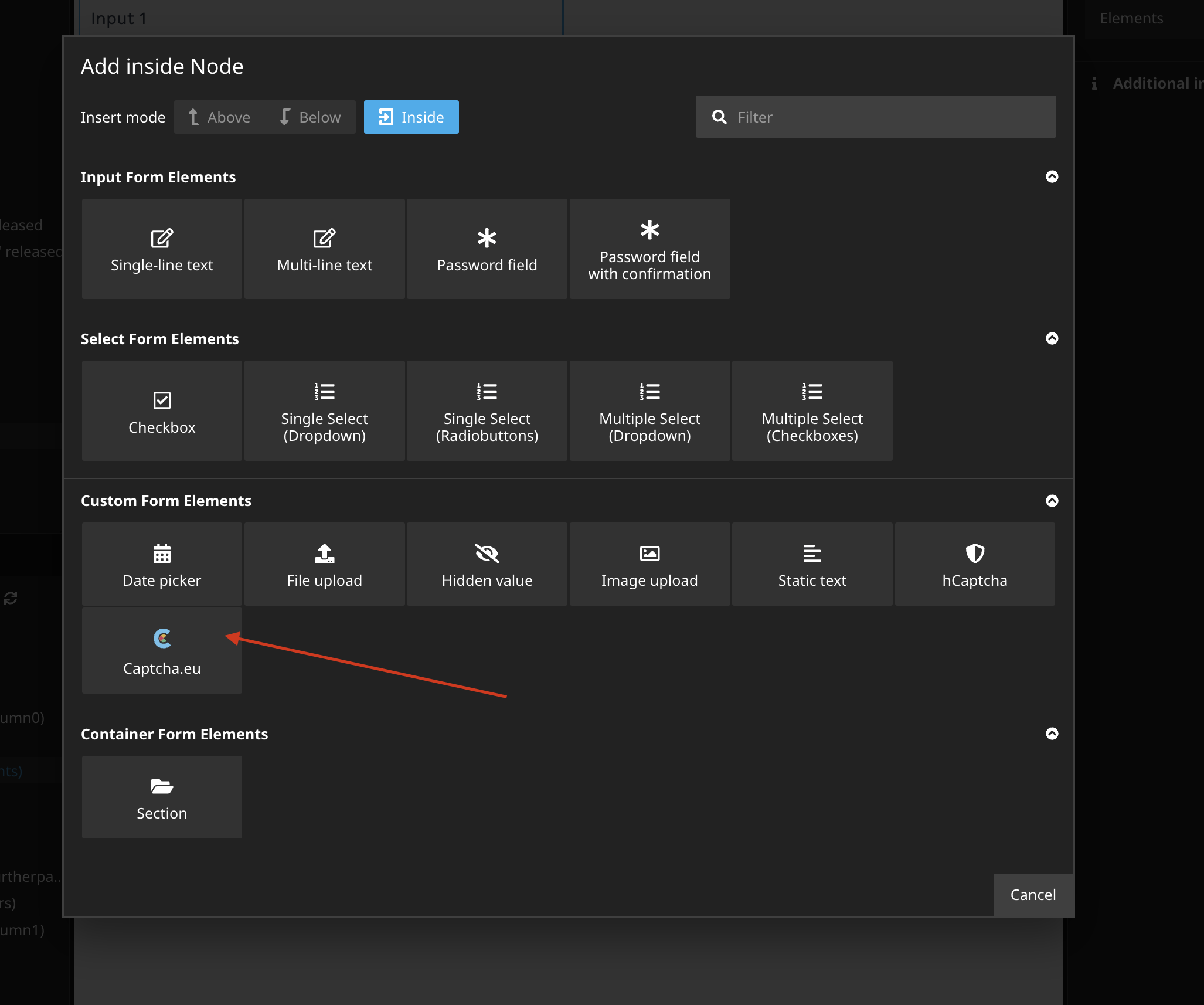
In the NEOS backend, create a new form using Neos.Form.Builder. Add the captcha.eu plugin to “Custom Form Elements”.
5
Now activate the plugin for Neos.Form by adding the new form element to your form definition renderables. Tip: You can override the configuration of your Public and REST Key in the node properties.
type: 'Neos.Form:Form'
identifier: someIdentifier
label: Label
renderables:
  -
    type: 'Neos.Form:Page'
    identifier: page-one
    renderables:
      -
        type: 'CaptchaEU.CaptchaEU:Captcha'
        identifier: captcha
        label: Captcha
        properties:
          publicKey: your-public-key
          restKey: your-private-key
finishers:
  -
   <Your finishers here>
That’s it! Your Captcha.eu plugin is all set up and ready to use across all forms on your NEOS site. If you’re encountering issues during the installation process or have any further questions, we’re more than happy to help: Simply get in touch via our contact form or online chat, or check out our detailed documentation for more guidance and support.
Keep your sign-up, login and contact forms protected at all times: Whether one or multiple domains, our fully GDPR-compliant, easy-to-use Captcha.eu plugin offers you everything you need to safeguard your NEOS site against bots and spam – all with just one click. No puzzles, no box-ticking. Get the Captcha plugin for NEOS now and discover the power of Captcha.eu!
 English
  German
  French
  Spanish
  Dutch
Dutch  Italian